Type the businesses you want, and get a list with contact details
From one keyword to a list of companies with contact info, then straight to sending emails.
No email connection needed — download the list you find to Excel.
See how it works
Results for “cafes · Gangnam-gu, Seoul” (sample): Sample Cafe A he***@gmail.com (Emails sent), Sample Coffee B co***@naver.com (Emails sent), Sample Bakery C in***@daum.net (Emails sent)
1. Type
The businesses you want, in one line
2. Collect
Companies with public contact info, as a list
3. Send
Send from your own email address
193 countries
Countries you can search
4 kinds
Types of info per company
Click the menu on the left to try each feature
Companies
Emails sent
Open deals
The company names and numbers in this demo are all made up.
From the first outreach to the final deal, one tool
Collect → send → follow up → meet → close. Manage your whole sales process on one platform.
Collect
Enter a keyword and we gather companies and contacts automatically
Send
Emails go out automatically, in the order you set
Analyze
Instant alerts on link clicks, an info completeness score, and wording picked for each company
Close
A pipeline board, proposals, and meeting booking take you to close
Collect & Send
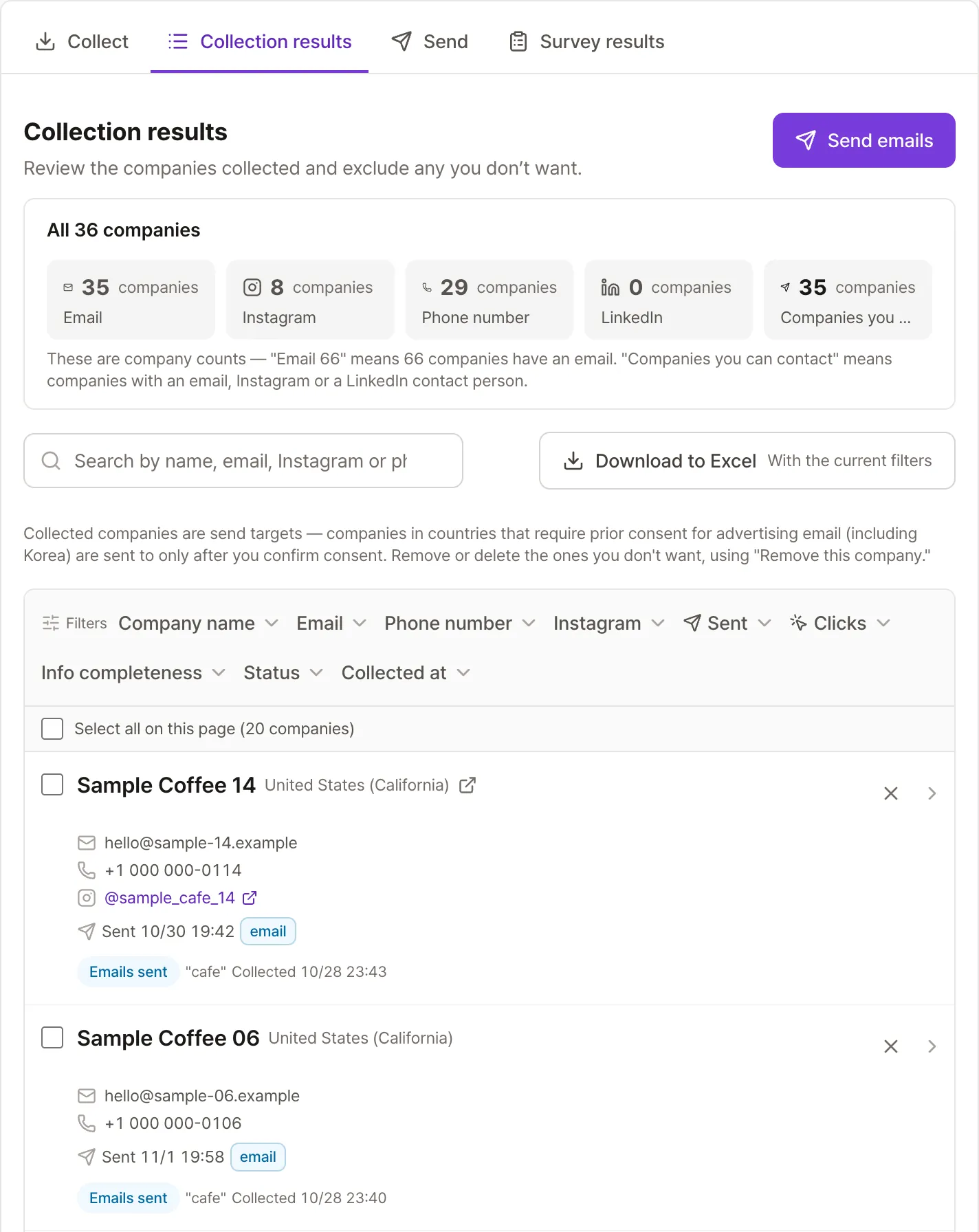
One keyword gets you companies and contacts
Enter an industry and region keyword, and we scan multiple sources at once to gather each company’s name, email, phone number, and Instagram handle. Choose only the information you need, and you won’t be charged if a company doesn’t have it.
- Get only the email, phone, or Instagram info you need
- No charge for missing info or companies you already have
- See the most promising companies first, ranked by completeness
- Tag and organize, then download to Excel
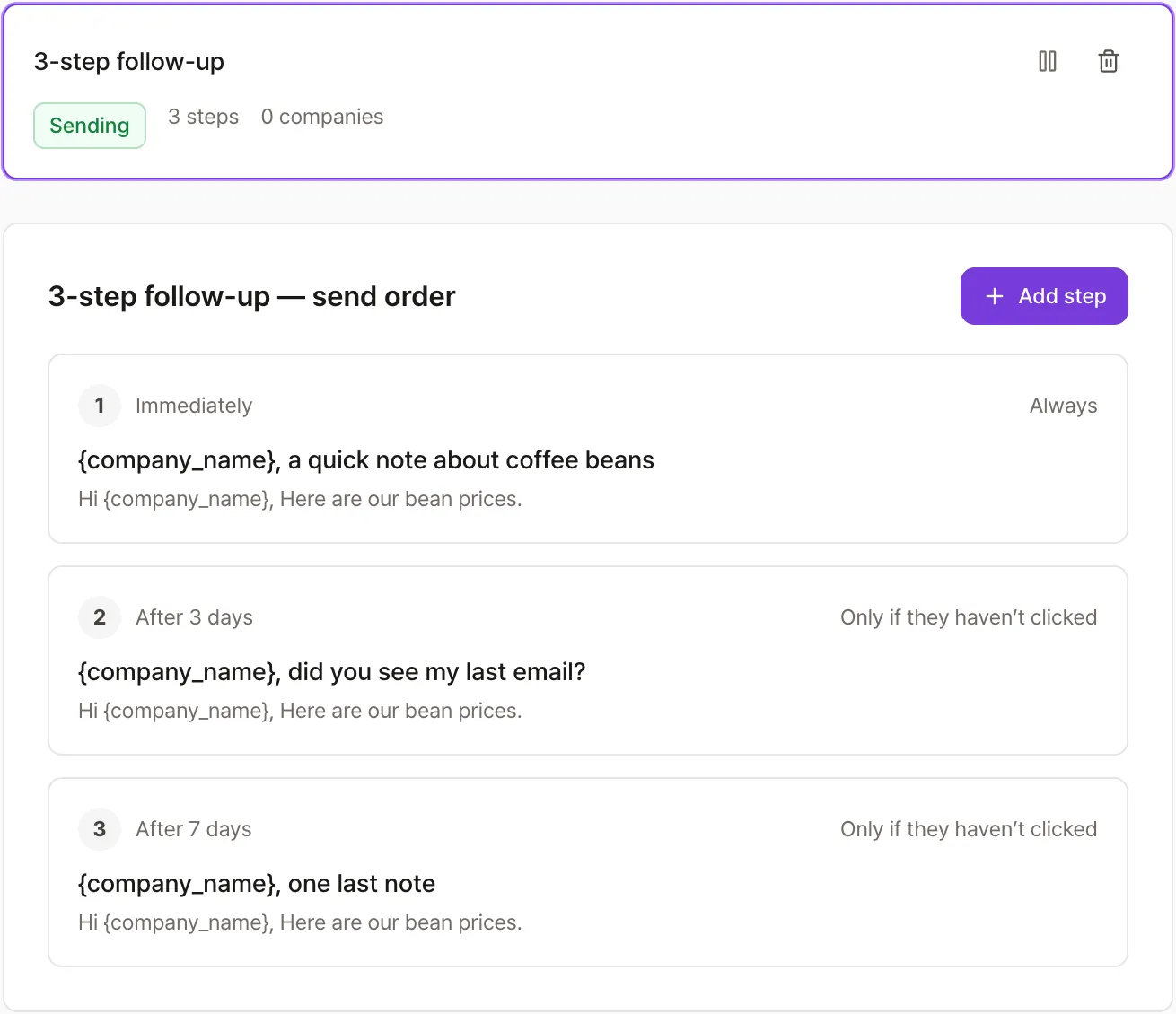
No reply? We follow up for you
Set it up once, and follow-up emails go out automatically based on your conditions. Boost response rates by sending only to prospects who haven’t clicked yet.
- Set a wait time and send condition for each step
- Pick the wording for each company you send to
- A spam-risk check before you send
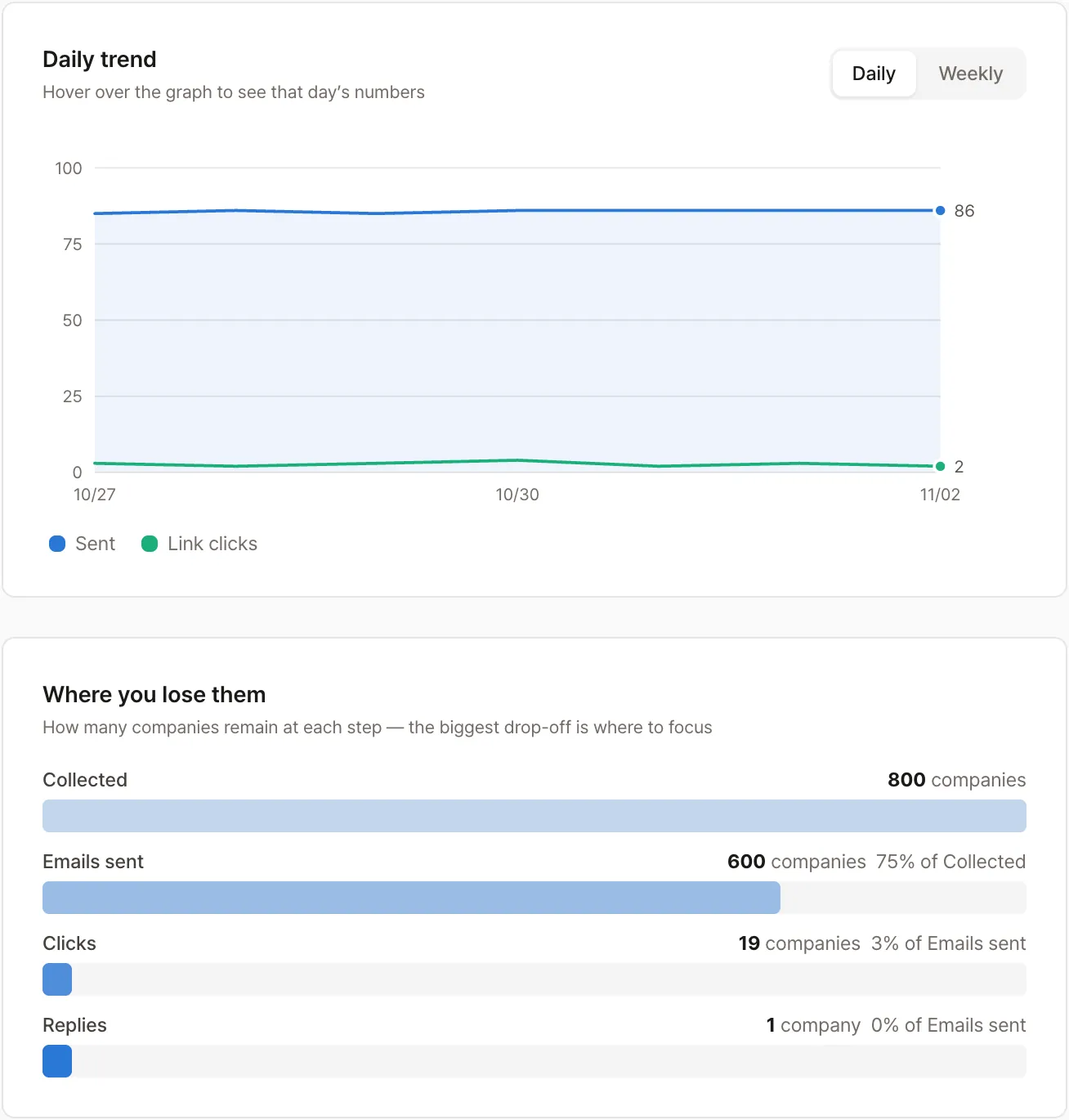
Real-time tracking & analytics
It shows up on your screen the instant they click your link. Who clicked the link and who replied are logged automatically.
- An instant alert the moment a link is clicked (0 seconds)
- Companies that clicked or replied show up in your list right away
- We check your inbox for replies every 10 minutes
- Performance at every stage: collected → sent → clicked → replied
Overseas companies, the same way
You can find companies and send emails the same way across all 193 countries. For 15 of them — including the US, Japan, and Germany — we even know the local language and industry terms, so results are more accurate. Where companies list contact information, and what the ad-email rules require, differ by country. In countries that need prior consent, such as Korea, businesses can be sent to once you mark that you have confirmed it. Pick a country and the contact-page search, the language of the email footer notice, and the phone number format are matched to it.
- We automatically find each country’s contact-info page (like Germany’s Impressum)
- Where prior consent is required, we send only after you confirm it
- The footer disclosure is added automatically in the local language
- Phone numbers and company names formatted the local way
Pick a country and we’ll show you its sending rules first
Businesses in countries that need consent, or whose rules aren’t confirmed yet, are left out of sending until you mark that you have confirmed either that the recipient agreed in advance, or that you received their contact details directly through a transaction and are advertising the same kind of goods or services within 6 months after that transaction ended.
Why Outreach
More important than sending is making sure you don’t waste money, and can keep sending
We don’t charge you for addresses that don’t exist
Before we send, we check whether the address is actually live. If it turns out not to exist, you’re not charged tokens, and it’s excluded from sending. We also automatically catch late bounces and refund those tokens.
Report unusable info and get a refund
If a number you received doesn’t exist, or the company has closed, report it right from the list. Once confirmed, we refund the tokens. You never end up paying for bad information.
Automatic ad label & opt-out
We add the Korean ad-disclosure tag, the sender’s information, and an opt-out link that advertising email needs. Korean businesses can be sent to once you mark that you have confirmed either that the recipient agreed in advance, or that you received their contact details directly through a transaction and are advertising the same kind of goods or services within 6 months after that transaction ended.
Safeguards that protect your sending account
New accounts ramp up their daily sending volume gradually to stay safe. Keeping bounces low is what keeps Gmail from routing your email to spam.
Replies stop the sequence automatically
We check your inbox automatically to detect who has replied. An interested prospect never gets another automatic follow-up that spoils the conversation.
Response data that gets sharper the more you use it
Whether a company clicked a link or replied builds up per company, so companies that actually respond surface first. You stop spending tokens on addresses that never respond.
Who it’s for
Suppliers & wholesalers
You gather prospective buyers with a region-plus-industry keyword, and need to reach out first by phone or email — whichever gets through
Agencies & freelancers
You find businesses that might need marketing, design, or development work, send your portfolio, and book the meeting
B2B startups
You need your first 100 customers, with no dedicated sales hire — so the founder runs outbound alone
Exporters going global
You need to find buyers in the US, Japan, or Europe, but not knowing that country’s ad-email rules has kept you from starting
Work we’ve handled
Finding Korean-owned businesses on the US East Coast, West Coast, and in Georgia, and emailing them
Sending invitation emails for an overseas event
Outreach by the numbers
$0
Spent on addresses that don’t exist
$0
Cost to sign up
Pricing
Get tokens every month with a plan, and top up extra tokens when you need more. You get free tokens when you sign up.
Contact info
Tokens are used for the info you receive, and nothing is used when there is none
Email send
Includes link-click tracking · refunded if it bounces
Free
$0 / month
Try it free
Basic
$14 / month
$134 per year (20% off)
Tokens refill every month
Pro
$35 / month
$336 per year (20% off)
Tokens refill every month
About 3x Basic
Max
$105 / month
$1,008 per year (20% off)
Tokens refill every month
About 12x Basic
Extra tokens never expire. Tokens you get each month from your plan don't roll over to the next month. Plans renew automatically every month (every year for annual billing).
Extra tokens
$1,000
30% off
Extra tokens
You pay $700
Enterprise
Custom quote
We design collection and sending around your industry and goals.
- Advanced collection and sending with AI agents
- Done-for-you setup — we configure everything from collection criteria to your company mailbox, sending limits and pace
- Send through more channels
- Custom features built for your company
- A dedicated contact
Included with every account
Free tokens on signup
Collect from 193 countries worldwide
Send emails & follow-ups
Link-click tracking
Address check before you send
Automatic bounce detection + refund
Automatic opt-out & ad label
Pipeline board, proposals & meetings
Blacklist & duplicate prevention
Report bad info for a refund
Account safety guide
Download to Excel
Frequently asked questions
- How are tokens charged?
- Tokens are used for each piece of contact info you receive. Getting both an email and a phone number from one business counts as two. Info we can’t find costs nothing. Sending an email also uses tokens.
- How much can I try after signing up?
- You get free tokens when you sign up. Without adding a card, you can collect businesses and send emails.
- What if a contact I collected is wrong?
- Report it on the screen and we refund the tokens after checking. Before that, we ask the receiving mail server before saving, so addresses that don’t exist are never saved.
- How do you protect my email account?
- Sender details and an unsubscribe option are added to every email, and there is a recommended daily limit. The recommended pace is one email, then about a 10-minute pause. Accounts are blocked based on the share of recipients who report spam, not on how many emails you send, so recipients always have a way to opt out. You can check the SPF, DKIM and DMARC setup of your sending address with our free tool.
- Which email accounts can I send from?
- Gmail, or another email account you connect by entering its outgoing and incoming server details. Emails go out from the connected account, and replies come back to it.
- Can I collect businesses outside Korea?
- Yes. Pick a country and a state or province, and we save only businesses confirmed to be in that area. Advertising-email rules differ by country, so we show you that country’s rules too.
CRM & Sales Management
A pipeline board you manage by dragging cards
From first contact to close, manage progress by dragging cards. See deal totals and win rates for every stage at a glance.
- Build your own stages (first contact → consult → meeting → proposal → contract → won)
- Track deal value plus win/loss stats
- Every company’s activity history at a glance
👆 Drag a card to move it to the next stage
FreshMarket
$3.2K
DesignLab
$1.5K
TechSolve
$5.0K
Greenfield Foods
$2.8K
Meridian Logistics
$8.5K
Call log
Log outgoing, incoming, and missed calls, with callback reminders
Proposals
Write a proposal → send it → see when it’s viewed
Meeting booking
Set your availability and share a public booking link
Work as a team
Share projects with your team. Tokens are billed to one shared wallet
Built for power users
Every tool a growing business needs
Saved email templates
Save subject lines and bodies you use often, and pull them up anytime. Write several wordings and one of them is picked for each recipient.
Spam-risk check
Before you send, we check for wording that could trigger spam filters, subject line length, and the opt-out notice.
Info completeness
We combine how complete a contact is, whether you’ve emailed them, and whether they clicked a link, to surface the most promising companies first.
Tags & notes
Tag companies and leave notes to stay organized.
Download to Excel
Download your collected company list as a file that opens directly in Excel.
API key integration
Connect to your existing CRM or in-house tools. Create and revoke connection keys right from the app.
Automate every step of your sales process
Finding companies, automatic follow-up emails, your pipeline board, proposals, meeting booking —
Outreach handles the repetitive work.